

How to Pause Coffee Subscription: Step-by-Step
Table of Contents
- How to Pause Coffee Subscription: Quick Step-by-Step
- Pause vs. Skip vs. Cancel: Which One Fits Your Situation?
- How to Skip Coffee Subscription Delivery for One Shipment
- How Long Can You Pause? Coffee Subscription Pause Length Rules
- How to Change Coffee Subscription Delivery Frequency Instead of Pausing
- Billing, Charges, and Refunds During a Pause
- How to Restart Coffee Subscription Deliveries
- When the Pause Option Is Missing: Troubleshooting Steps
- Frequently Asked Questions
Last Updated: October 18, 2026
How to Pause Coffee Subscription: Quick Step-by-Step
Learning how to pause coffee subscription deliveries takes about two minutes in most account dashboards. This guide walks you through the exact steps, plus what to do when the pause button is missing.
Here is the short version:
- Log in to your subscription account.
- Open subscription settings.
- Choose your pause dates.
- Confirm and save.
The rest of this guide covers the timing rules, billing questions, and edge cases that trip people up.
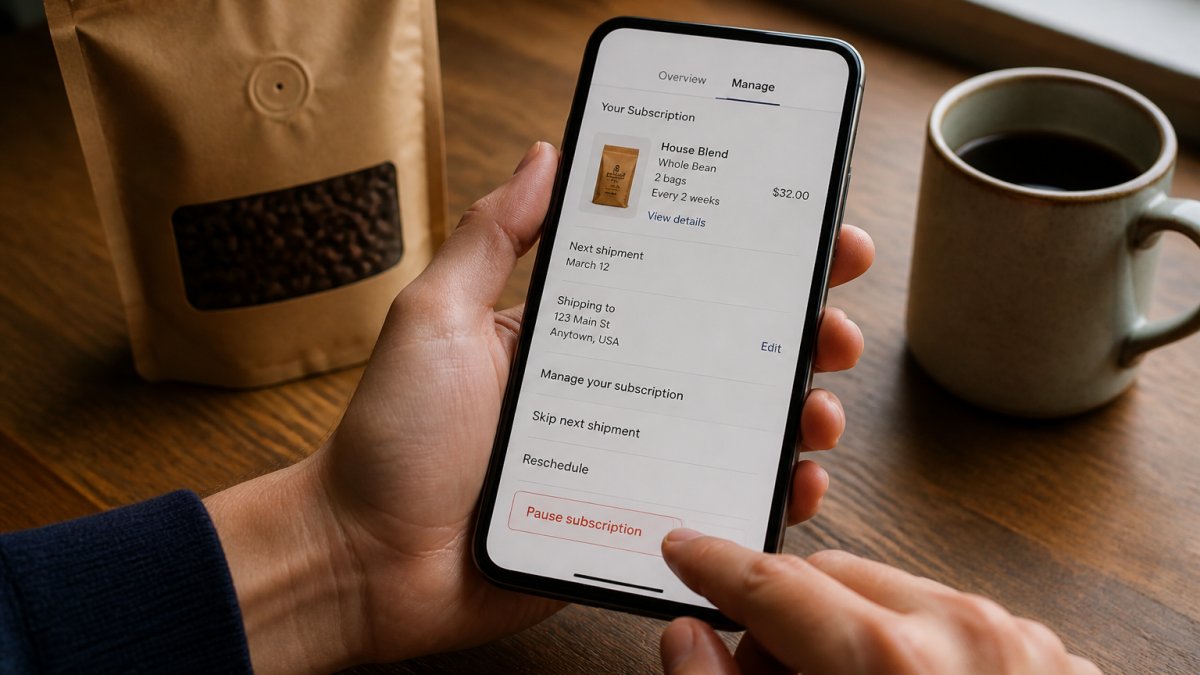
Step 1: Log In to Your Subscription Account
Sign in with the email tied to your recurring order, not a newer one, or you may land in an empty dashboard. If you cannot recall the password, use the reset link rather than creating a second account, a duplicate account is the most common reason people cannot find their subscription settings later.
Step 2: Find Subscription Settings and Pause Controls
Look for a menu labeled Subscriptions, My Account, or Manage Subscription, then select the active coffee subscription rather than your order history. Pause controls usually sit next to the delivery schedule. On mobile, scroll past the product details before assuming the option is missing.
Step 3: Choose Pause Dates and Confirm
Pick a start and end date, then save. Check the confirmation screen for the next billing date before you close the tab. If a charge is scheduled sooner than your pause start, your request likely missed the processing deadline for the upcoming shipment.
Pause vs. Skip vs. Cancel: Which One Fits Your Situation?
Pause, skip, and cancel solve three different problems. A pause holds your whole subscription for a set period, a skip removes one shipment, and a cancel ends the plan entirely.
Use this table to decide:
| Situation | Best Option | What Happens |
|---|---|---|
| Vacation or travel | Pause | No shipments, no charges during the window |
| One busy month | Skip shipment | One delivery removed, plan continues |
| Too much coffee on hand | Skip or pause | Skip for one cycle, pause for longer |
| Done with the service | Cancel | Recurring payment stops |
| Tight budget for a while | Pause | Temporary hold, easy restart |
A skip is the lighter touch: your schedule stays intact and the next shipment arrives on its normal date. A pause suits a clean break of several weeks.
How to Skip Coffee Subscription Delivery for One Shipment
Skipping a single delivery is the fastest fix when you have unopened bags stacked in the cupboard. Open your subscription settings, find the upcoming shipment, and select Skip This Delivery. Once a shipment enters processing, the skip option usually disappears.
A few things to know about skips:
- Skips typically apply to one future shipment at a time.
- Your billing cycle shifts so you are not charged for the skipped order.
- Some services limit how many consecutive skips you can stack.
If you need a break longer than one cycle, a pause is cleaner than chaining skips together.
How Long Can You Pause? Coffee Subscription Pause Length Rules
Pause length is where most subscribers get surprised, because the rules are not standardized and are rarely printed on the signup page. The mechanics matter: whether a pause is time-limited or indefinite, whether it auto-resumes or waits for you, and what changes at the edges of the allowed window.
Typical pause windows
A common pattern is a pause window of one to three billing cycles, with many providers capping the hold at 60 or 90 days.
Treat those numbers as a starting range. The only authoritative answer is the pause selector in your own account, if the calendar stops at a certain date, that is your plan's ceiling.
Time-limited versus indefinite pauses
Pause tools generally fall into two models:
- Fixed-end pause. You choose a start and end date, and the subscription resumes automatically on the end date. This is the most common self-serve model because it requires no follow-up from you.
- Indefinite hold. The subscription stays paused until you manually resume. Less common, but some providers offer it for members who want an open-ended break.
Know which model you are in before you close the tab. A fixed-end pause that you forget about will restart and bill on the end date. An indefinite hold that you forget about will never ship again, which is fine until you wonder why the coffee stopped.
Auto-resume versus manual restart
Auto-resume is convenient but easy to miss: the first shipment after the pause processes on normal lead time, so the charge can land only a few days after the pause ends.
Manual restart puts the timing in your hands, but nothing ships until you act. Look for a label like Resume Subscription, Restart Deliveries, or Reactivate, and confirm whether a restart date is required or optional.
What changes at the edges
Three things tend to shift when a pause runs long:
- Pricing and promotions. Introductory pricing and member discounts are often tied to an active subscription. A long pause can end a promotional rate, and the plan may resume at standard pricing. Check the terms page before committing to a multi-month hold.
- Loyalty and rewards. Programs that reward consecutive months or a certain number of shipments may treat a long pause as a break in continuity. A pause of a few weeks is usually safe; a pause that spans several cycles is where perks can reset.
- Product availability. Seasonal lots and limited releases rotate.
How to choose a pause length
Work backward from your calendar. If you leave on the 10th and return on the 24th, start the pause a few days before the 10th to clear the processing deadline and end it a few days after the 24th. Pausing to drink through a backlog? Divide your bag count by monthly consumption for the minimum length, then add a buffer week.
How to Change Coffee Subscription Delivery Frequency Instead of Pausing
Sometimes the real problem is pace, not volume. If bags pile up every month, switching from every two weeks to every four weeks solves it without a pause. Frequency changes usually live in the same settings panel, under Delivery Schedule or Delivery Frequency.
Consider a frequency change when:
- You consistently have extra bags left at reorder time
- Your usage changed after a schedule shift or a new roommate
- You want a steady supply but at a slower cadence
Adjust the cadence first, then pause only if the mismatch continues.
Billing, Charges, and Refunds During a Pause
A pause stops future charges, but it does not reverse a charge that has already been authorized or captured. The outcome depends on where the order sits in the fulfillment pipeline when you hit pause.
Does a pause stop charges?
Yes, for charges not yet initiated. Once a pause is confirmed and saved, billing for the paused window is suspended. The catch is timing: a charge already authorized before your pause confirmation will still go through.
What happens to an order already in processing
Orders move from scheduled to processing (payment authorized, order sent to fulfillment) to shipped. A pause can stop an order in the scheduled stage, but usually not one that has reached processing.
If your pause confirmation screen shows a next billing date that falls before your pause start date, that is the signal that an order is already in motion.
Refund rules during a pause
Refund policies vary, but a few patterns are common:
- Order not yet shipped. Many providers will cancel and refund an order that has processed but not shipped, especially if you contact support promptly and explain that a pause was intended.
- Order already shipped. Once coffee is in transit, most providers treat the sale as final, particularly for perishable or freshly roasted products. Some will offer a credit or a replacement rather than a refund.
- Charge after a confirmed pause. If a charge lands after you have a confirmed pause and the order had not yet entered processing, that is a billing error on the provider's side. Support can usually reverse it, and a confirmation screenshot speeds the process.
Refunds are not automatic, you generally have to ask, and the outcome depends on the order stage and the provider's policy.
Proration and partial cycles
Proration is uncommon in coffee subscriptions. Most plans bill per shipment rather than per day, so a pause that starts mid-cycle generates no partial charge or credit. Pause after a shipment bills and you have paid for it; pause before the next billing date and you skip that charge entirely.
How to avoid surprise charges
- Pause before the processing deadline. The deadline is usually shown on the subscription page, often a few days before the shipment date. Pausing after the deadline is the single most common cause of a charge during a pause.
- Confirm the next billing date on the confirmation screen. If it falls inside your pause window, the pause did not take effect in time.
- Check for a pause confirmation email. A saved pause usually generates a confirmation. If you do not get one, the change may not have saved.
If a charge lands after a confirmed pause
Contact support with your account email, the pause confirmation (screenshot or email), and the charge date and amount. Ask whether the order can be canceled before shipment and whether a refund or credit is available. Reach out as soon as you notice the charge.
How to Restart Coffee Subscription Deliveries
Restarting is usually simpler than pausing. Open subscription settings, find the paused plan, and select Resume Subscription or Restart Deliveries. Set your next shipment date and confirm the payment method is current, an expired card is the most common reason a restart fails silently.
Some accounts let you swap products, change grind size, or adjust quantity before the first order processes, so review the upcoming shipment before the processing deadline.
When the Pause Option Is Missing: Troubleshooting Steps
No pause button usually means one of four things: you are in the wrong account, the plan does not support pausing, a shipment is already processing, or the control lives somewhere unexpected.
- Confirm you are signed in with the account email tied to the subscription.
- Look under Manage Subscription rather than order history.
- Check whether an upcoming shipment shows as processing.
Support teams can often apply a pause manually if the self-serve tool is unavailable. Ask them to confirm the change in writing so you have a record.
Frequently Asked Questions
How do I pause my coffee subscription?
Log in to your subscription account, open the subscription settings, and select the pause option. Choose your pause start date and length, then confirm. If you cannot find pause controls in your account, contact customer support before your next order's processing deadline so the upcoming shipment can be held. Pause rules vary by provider, so check your subscription policy for exact steps and cutoff times.
Will I be charged while my coffee subscription is paused?
Most coffee subscription services stop recurring payments during a pause, so you are not billed for shipments you will not receive. Any order already in processing before the pause takes effect may still be charged and shipped. Check your subscription policy or contact customer support to confirm how billing cycles and processing deadlines apply to your pause, and ask whether a refund is possible if a charge goes through after you pause.
How long can I pause a coffee subscription?
Coffee subscription pause length depends on the provider. Some allow a temporary pause of one to three months, while others let you pause indefinitely until you resume. Your subscription settings usually show the maximum pause duration and the date deliveries will restart automatically. If you need a longer break than the limit allows, ask customer support about extending the pause or canceling and restarting later.
Can I change my delivery frequency instead of pausing?
Yes. If you drink coffee inconsistently, changing your delivery frequency is often simpler than pausing. In your subscription settings, look for delivery schedule or delivery frequency options and switch from every week to every two weeks or monthly. This keeps fresh-roasted coffee arriving on a schedule that matches your usage, avoids gaps, and prevents the buildup of extra bags you may not finish.
Pausing should take two minutes, not two emails to support. At Goodest coffee company, our subscription account tools let you pause, skip a shipment, or adjust your delivery frequency without calling anyone, and our team is reachable if a control ever goes missing. Get started with Goodest coffee company and keep fresh-roasted coffee arriving on your schedule, not the other way around.